Full-screen app grid
A full-screen grid that adapts to your display, so every installed app is in view.
OpenLaunchPad is a free, open-source app launcher for Mac. It offers a Launchpad-style full-screen app grid, instant search, folders and drag-and-drop arranging across pages, so you can find and open installed apps visually.
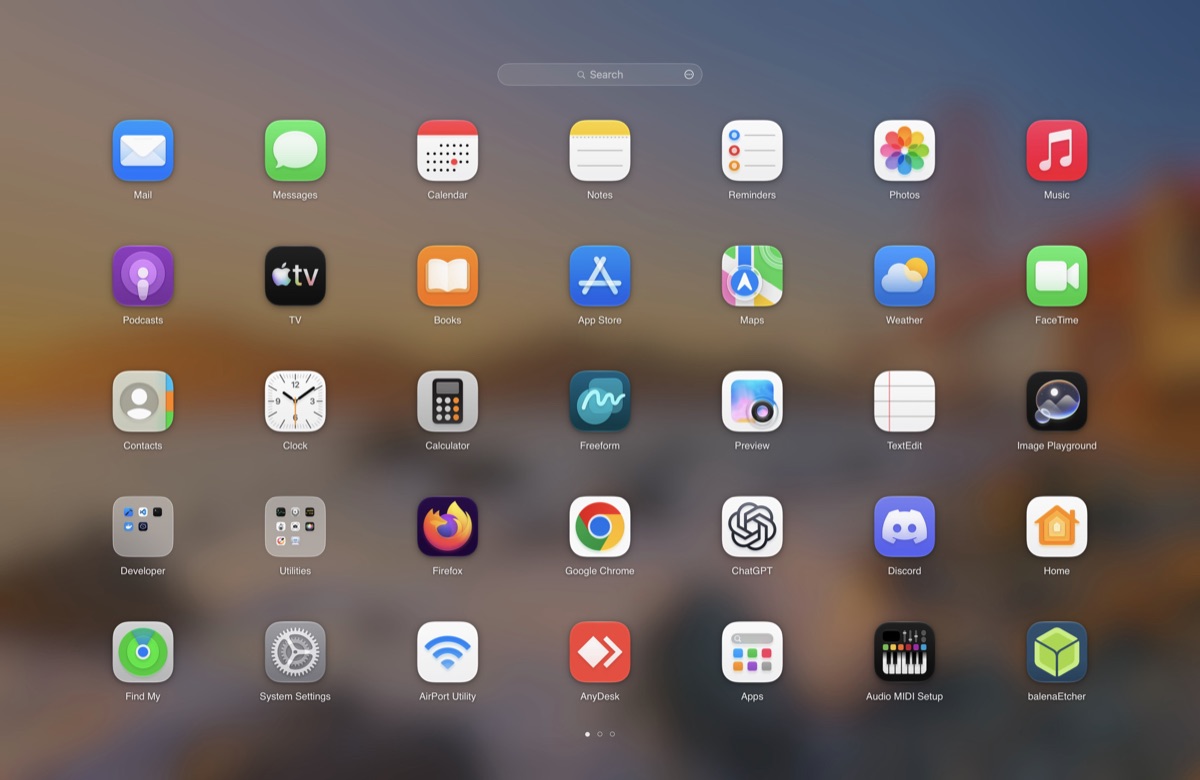
OpenLaunchPad is a free, open-source Launchpad alternative for Mac with a full-screen app grid, instant search, folders and drag-and-drop arranging. It runs on Apple silicon Macs with macOS 15 or later, with no account and no telemetry.
Sources: official GitHub README · releases and downloads
Browse apps in a full-screen grid, type a name to search, or group the tools you use most into folders. Your layout is saved locally on your Mac.
A full-screen grid that adapts to your display, so every installed app is in view.
Search runs locally and works with input methods. No account, and no waiting on the network.
Rearrange apps, drag one onto another to make a folder, or move it to another page. Your layout stays on your Mac.
Flip pages with a trackpad, mouse or keyboard. Drag an app to the edge of the screen to move it across pages.
Built with AppKit and Core Animation, with support for multiple displays, keyboard navigation and Reduce Motion.
Open source under the MIT license. No sign-in, no activation, no telemetry, and no always-on connection required.
Requires macOS 15 or later on Apple silicon. Intel Macs are not supported yet.
GitHub Releases lists every version and download. If something goes wrong, open a GitHub Issue with your macOS version, Mac model and steps to reproduce.
System requirements, features, pricing and installation: what to check before you download.
OpenLaunchPad is a free, open-source app launcher for Mac. It offers a Launchpad-style full-screen app grid, instant search, folders and drag-and-drop arranging across pages, so you can find and open installed apps visually.
Yes. OpenLaunchPad suits Mac users who want a full-screen app grid with search and folders. It is an independent open-source project. It is not Apple's Launchpad and is not affiliated with or endorsed by Apple.
OpenLaunchPad requires macOS 15 or later on an Apple silicon Mac (M1 or newer). Intel Macs are not supported at this time.
Yes. OpenLaunchPad is released under the MIT license with its source code on GitHub. You can download and use it for free, with no sign-in, activation or subscription.
Drag one app onto another to create a folder. Drag apps to rearrange them, or drag an app to the left or right edge of the screen to move it to another page. Your arrangement is saved locally on your Mac.
Yes. Open the grid and start typing to search instantly, with input method support. OpenLaunchPad watches /Applications, /System/Applications and your user Applications folder for changes.
Launching, searching and organizing apps do not need an internet connection. OpenLaunchPad requires no account and sends no analytics or telemetry; your layout is stored on your Mac. You only need the internet to download the app or check GitHub for updates.
Download OpenLaunchPad.dmg, open it and drag the app into Applications. You can also keep it in the Dock. The current download is not yet notarized by Apple. If macOS blocks the first launch, go to System Settings → Privacy & Security, confirm the source and choose Open Anyway.
Free and open source. Runs on Apple silicon Macs with macOS 15 or later.